How to become a meme creator
A meme creator turns an observation into a joke through an image and caption. Start with a subject you know, write a few versions and choose the wording that fits the scene.

Keep the process as well as the finished image. Being able to explain the audience, caption and edits gives you something useful to show in a portfolio.
Practise the skills behind the caption
Notice a specific moment
Choose a habit, frustration or small win you know first-hand. “Work is busy” is a topic; reaching inbox zero just before another email arrives is a situation.
Understand the image
Look at the reaction and the roles in the scene. Success Kid can carry a small victory; a dilemma needs a different format.
Write more than one angle
Try a reward, a reversal or an extra detail. Read each option aloud and keep the version that says what you meant.
Review the finished image
Leave the reaction visible and check the caption at sharing size. Give a new reader enough context to understand the joke.
For a comparison of image meanings, use the template-choice guide.
Turn an observation into a caption
Practice brief
Write a small-victory joke for people handling work email.
Use the same top line and change what follows the win. These practice options show three directions you could take.
Reward
- Top line
- Inbox zero
- Bottom line
- Time for coffee
Fleeting win, shown below
- Top line
- Inbox zero
- Bottom line
- For six whole seconds
Another task
- Top line
- Inbox zero
- Bottom line
- Report still untouched
| Angle | Top line | Bottom line |
|---|---|---|
| Reward | Inbox zero | Time for coffee |
| Fleeting win, shown below | Inbox zero | For six whole seconds |
| Another task | Inbox zero | Report still untouched |
For this brief, the fleeting-win line adds a reversal: the inbox is empty, but the moment does not last. The raised fist carries the celebration. Both lines stay short enough to leave the face and fist visible.

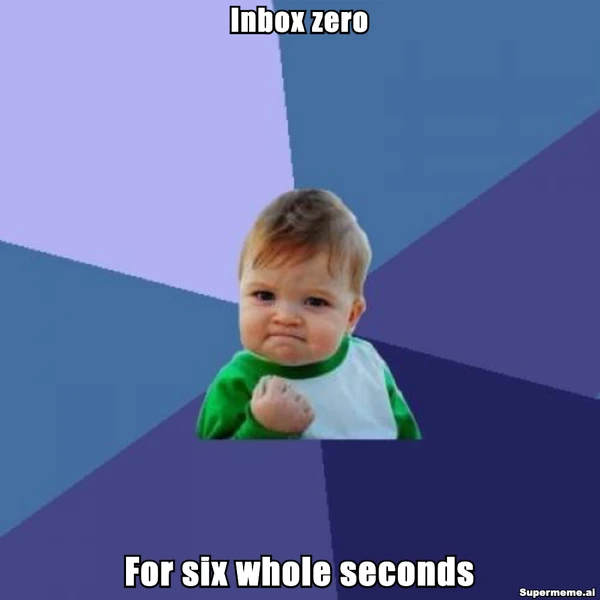
Use the options above to practise your own revision. The pictured caption is an existing example; the other two lines are suggestions to try.
Put the win at the top and its duration at the bottom. Check the downloaded file at the size you plan to share it. If a line needs zooming, shorten it or give it more room.
The editor opens with two placeholder captions. Replace them yourself; the finished example is a separate image.
For the editing and download steps, read the meme creation guide.
If the words are hard to read, the meme font guide covers size, placement and contrast.
Build a portfolio for paid briefs
Show a small selection of work and the choices behind it. Label practice clearly, name your role and explain what you changed. A folder or simple page is enough to start.
A sample portfolio entry
Self-directed practice
- Brief and audience
- A small-victory joke for people handling work email.
- Your role
- Caption writing, selection and placement. Identify the template or image source separately.
- Drafts and revision
- Compare a coffee reward, a fleeting win and an unfinished task. Choose the duration line because it changes the meaning of the celebration.
- Final image and review
- Include your exported image and explain whether the text stayed readable without covering the reaction.
- Publication and results
- Add these only if the work was published and you have the records. A practice image does not need invented reach or engagement figures.
The entry above is a suggested structure. Replace it with your own work and account of the process.
Make the scope of paid work clear
Decide what you are offering: caption concepts, finished images or a post on your own account. Discuss the brief, deliverables, revisions, approval, deadline and intended use before starting. A portfolio shows your decisions; it does not guarantee a commission.
Examples of creator partnerships
In its February 2024 creator-marketplace announcement, Meta described creator portfolios and project briefs with requirements and rates.
Read Meta’s creator-marketplace exampleTikTok’s September 2026 South Africa announcement describes paid brand collaborations through TikTok One. Participation depends on the campaign’s requirements. These programmes concern general creator work, not typical meme-creator earnings.
Read TikTok’s South Africa announcementFor work built around a campaign goal, the meme marketing guide covers audience, message and review.
The Chief Meme Officer guide discusses a related brand-content role.
Choose tools for the task
Place exact captions
Use the manual meme maker when you know the words you want. Review the downloaded image, as well as the editor preview.
Open the meme makerFind an image for the idea
Browse formats and look for a scene that matches the reaction. Choose one with room for the caption.
Browse meme templatesExplore a draft idea
Describe a specific situation to the AI generator. Review its suggestions and rewrite vague wording in your own voice.
Try text-to-memeTurn the idea into a feed post
Add the context your followers need, then decide where the joke belongs alongside your usual content.
See the influencer meme workflowKeep notes after publishing
Record the idea, template, edits and responses available on your platform. Choose measures that match the goal, such as reach for distribution or relevant replies for a discussion. Compare with your usual posts on the same account, and note what you would change next time.
Start with one observation and a few caption options. Choose a version, check the finished image and keep the drafts so you can explain the decision.
Written by
Sanjeev NCCo-founder of Supermeme.ai. Building the default meme generator of the internet since 2022.