Meme marketing platform: from campaign idea to branded meme

A meme marketing platform helps you turn a campaign idea into a meme you can edit, brand and download. In Supermeme, start with a situation: the AI matches templates and writes caption options. Choose one, edit it and apply your brand kit before exporting.
Supermeme handles creation and editing. Your team reviews the draft, publishes through its usual tools and measures the campaign there. Here is what that workflow looks like for a customer research campaign.
Start with one campaign point
Decide who the meme is for and what it should say before opening the generator. The meme marketing strategy guide covers audience, campaign goals and measurement. This page picks up when you have an idea and need to make the asset.
From the brief to a usable meme
A brief such as 'promote our customer interview guide' tells the team what to promote. It does not give them a joke. Look for the situation behind it: a marketer can describe the product's features but still struggles to understand why people buy.
That observation gives the generator something concrete to work with. Keep the full brief for review; use the familiar situation as the prompt.
A campaign example, step by step
Example brief: Nimbus customer interview guide
Nimbus is a fictional customer research tool. The audience is product marketers. The campaign promotes an interview guide, and the point is simple: ask customers why they chose you instead of guessing.
Situation to try in the generator
A product marketer is trying to understand why customers buy their product.
1. Generate options and choose a direction
Enter the situation above to get template and caption options. Compare them against the brief: will a product marketer recognise the problem, and does the template express that reaction? Keep the fitting idea, even if its caption needs work.
Already know the format you want? Browse meme templates and start there. The Supermeme and Imgflip comparison explains starting with an idea versus choosing a template first.
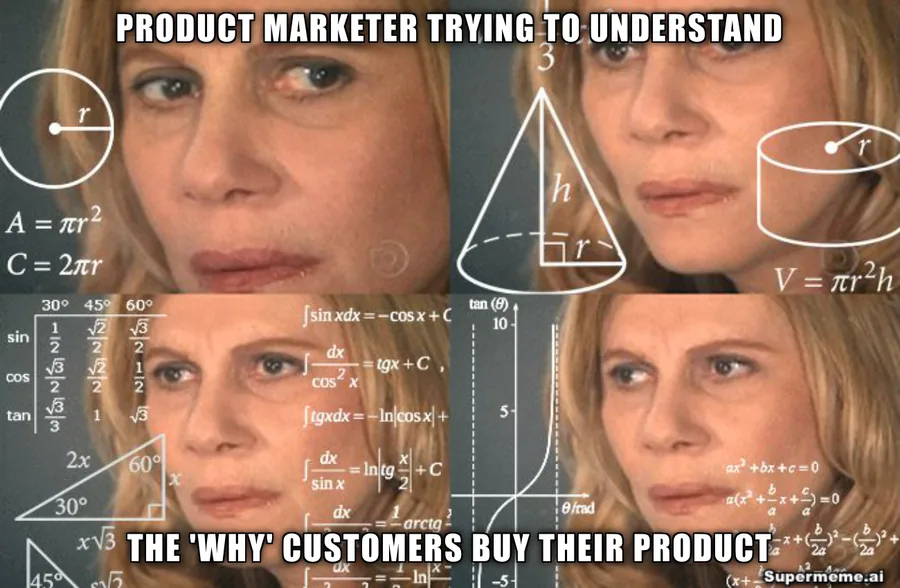
The confused math reaction fits the marketer's uncertainty. The caption names the problem without making the customer the target of the joke.
2. Edit the caption and add brand styling
Remove words the image already explains. Check that the joke still works after the edit. A familiar template can lose its meaning when the caption asks it to express the wrong reaction.
The meme creation guide walks through caption, layout and template checks if you need a starting point.
Switch on your selected brand kit for the logo badge and brand styling. Brand colours style the header and footer bars, and the brand font applies to their text; meme captions have their own editing controls.
Mascots are a separate choice. Add a mascot sticker in the editor, or use AI mascot generation to restyle a template when your plan supports it. You can use logo styling without restyling the template.
For the Nimbus draft, choose an indigo brand colour, put the logo in a corner that leaves the caption clear and add a footer: 'Ask customers what made them choose you.' The branding page shows an illustrative Nimbus layout; it is a style example rather than a downloaded product result.
3. Review the draft with the brief
Send the draft and campaign context through the review tools your team already uses. For Nimbus, check:
- Does the joke describe a product marketer's problem?
- Can you read the caption and recognise the logo at the final size?
- Does the surrounding post explain what the interview guide offers?
- Are the wording, image choice and permissions suitable for this campaign?
Make the agreed changes in the editor. If you asked the generator to avoid a phrase, check the output yourself before approving it.
4. Export, publish and measure
Download the selected image and inspect the file before sharing it. Then publish through your social scheduler, email tool or presentation software. Branded downloads require a paid plan.
Use the social media meme guide for posts or the cold outreach meme guide for recipient-specific messages.
For the fictional Nimbus campaign, track clicks to the interview guide and the action people take there. Likes can help you understand the response, but they do not establish that the guide reached the right buyers.
The button fills the prompt without generating. Sign in to generate; brand-kit limits and AI mascot access depend on your plan.
What Supermeme handles today
Use Supermeme for the creative work between the idea and the image:
- Text-to-meme generation with template and caption options
- Curated meme templates and search by meaning
- Caption, placement and formatting edits
- Brand kits for logo badges and header/footer styling
- Optional mascot stickers and AI mascot generation
For template search, check the listed search languages. Check generated captions for the language you intended, and ask a native speaker to review wording and cultural context for each audience.
For generation inside another app or automation, use the meme API. For supported AI assistants, connect Supermeme's MCP server. Both require paid access. These are ways to create memes in a workflow; publishing and reporting stay in your chosen tools.
Social campaigns
- Campaign concepts: Compare joke and template directions from one product observation before choosing a post.
- Local versions: Adapt the wording for each audience. Check the caption's language and cultural context before publishing.
Sales and internal communication
- Sales outreach: Use a prospect's familiar problem as the starting point for an email or follow-up image.
- Internal updates: Illustrate one point from an announcement, meeting or presentation.
Agency and multi-brand work
- Separate brand kits: Choose the kit for the right client. The number of kits available depends on your plan.
- Creative directions: Give the client several caption and template options, then finish the selected image.
Making campaign memes every week?
Try one situation first. If the results and editing workflow fit your team, compare generation volume, brand-kit limits and API access before choosing a plan.
Written by
Sanjeev NCCo-founder of Supermeme.ai. Building the default meme generator of the internet since 2022.